
WordPress 7.0 is here. It brought some long-awaited updates, a new admin UI that doesn’t quite match the rest of the dashboard, and WordPress 7.0 AI features that feel less like a deliberate product decision and more like a platform trying to keep pace with an industry moving faster than it can steer.
Before this release, I wrote three posts. One about the hidden token costs nobody was explaining to end users. One about how AI plugin lock-in is worse than anything we’ve seen before in this ecosystem. And one about what the agentic web actually requires if WordPress is going to be part of it. Those posts were about what was coming. This one is about what’s here. And it’s playing out exactly the way I said it would.
WordPress 7.0 AI Features: The Connectors Screen Nobody Prepared Users For
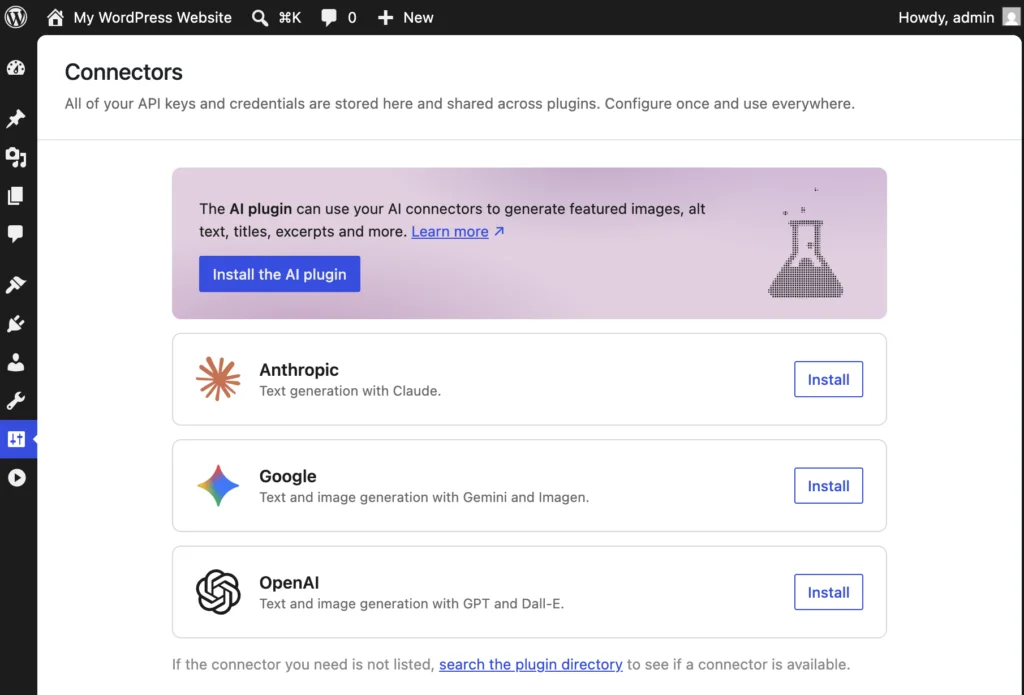
Open a fresh WordPress 7.0 install and go to Settings. You’ll find a new Connectors screen. It presents fields for Anthropic, Google, and OpenAI API keys. Clean UI. Simple enough. Enter your key and the WordPress 7.0 AI features start working.
What it does not tell you:
Your Claude Pro subscription is not your API key. Your ChatGPT Plus account is not your API key. These are entirely separate billing relationships. The API is pay-per-use, billed against a balance you fund independently from any subscription you already have. In other words, a user who sees “connect Anthropic” and assumes it means “use my existing Claude account” is about to learn an expensive lesson with no warning from the screen that invited them in.
There is no budget warning. No usage estimate. No explanation of what a token is or what common operations cost. Just a field, a save button, and the assumption that whoever is filling this out already understands what they are agreeing to.
Most of them don’t.
The Banner in That Screen Is an Advertisement. Read the Fine Print.

Here is where it gets specific.
When I loaded the Connectors screen on my own site, I saw a blue banner at the top. It recommends the AI Engine plugin and pitches it as the solution for managing your AI providers and keeping API costs under control. For a user staring at an unexplained API key field, that sounds like exactly what they need.
However, that banner did not come from WordPress core. It came from Media Cleaner. A plugin I have installed to manage my media library. Media Cleaner and AI Engine are both built by the same developer, Jordy Meow. I installed Media Cleaner to do one job. Instead, it is using that installation to run an advertisement on a screen where users are already confused and looking for guidance. That is not a relationship I agreed to.
What the Banner Is Selling and What It Is Not
The claim that AI Engine helps you manage API costs is technically true. In the Pro version, starting at $59 a year, there is a “Usage Insights & Control” feature that monitors token usage and costs. That is a real feature and it sounds useful.
However, the free version, which is what the banner links to, has none of that. No spending dashboard. No budget cap. No alert when you are approaching a limit. As a result, a user who installs the free plugin because the banner told them it would help manage costs will get no cost management whatsoever. To get the feature the banner implies, they would need to purchase a license they do not know they need yet.
The banner shows up on the exact screen where a user is most likely to believe that claim and act on it. The fine print that cost management is a paid feature in a separate product, is nowhere near that screen.
Every Plugin That Hooks Into WordPress 7.0 AI Features Shares Your Budget
Here is the part I have not seen anyone talk about yet.
The Connectors screen is not just for core WordPress AI features. It is infrastructure. Any plugin can hook into it. And any plugin that does will draw from the same API budget you connected.
Consider what that means in practice. A user connects their Anthropic API key. They install a plugin that suggests blog post titles. They then spend twenty minutes clicking “suggest another title,” not liking the results, clicking again. Each suggestion requires the plugin to read the post content and send it to the API. Every single click is a round trip. The full post body goes out each time. As a result, tokens burn on every request.
This is not hypothetical. The title suggestion UI is already shipping and being demoed publicly. Even so, nobody in those demos is talking about what is happening at the API level every time you click that button.
Meanwhile, the user has no meter in the dashboard. No running total. No warning when the balance runs low. The feature works until it stops working, and when it stops there is no error message that makes sense to someone who has never heard the word token. They do not know if the plugin is broken or if WordPress is broken. They just know it stopped.
They are going to blame WordPress.
The WordPress 7.0 AI Features Delay Was an Opportunity That Didn’t Get Used
WordPress 7.0 was pushed back multiple times. There were legitimate conversations in the community about stability, about the new UI direction, about readiness. That delay was an opportunity to get the AI integration right. To add spending visibility, to make the API key connection screen explain itself, and to ship a guardrail alongside the feature.
Instead, what shipped is a screen that looks clean, onboards in thirty seconds, and leaves the user entirely responsible for understanding a billing model the UI never mentions.
Meanwhile, the plugin ecosystem, conditioned over years to move fast and fill gaps, is already there. Some developers are doing it thoughtfully. Others are doing what that banner does: showing up where users are confused, making claims that sound reassuring, and walking away before the bill arrives.
Where I Stand
I do not use AI features in my WordPress dashboard. Instead, I use MCP and the Abilities API. I run Claude outside the dashboard with full control over context, cost, and workflow. That setup does everything I need and nothing I did not ask for.
I am not against AI in WordPress. In fact, the three posts I wrote before this release make that clear. I believe the agentic web is real and that WordPress has a genuine role in it. AI could genuinely bring a new generation of users to this platform, and I am here for that. But that opportunity depends on those users being informed before they are committed, not after the bill arrives.
WordPress runs 43 percent of the web. Most of those sites are not run by developers. They updated to 7.0 because WordPress told them to. They saw the Connectors screen. Some of them typed in their API key because a banner told them it would help manage costs.
The good news is this conversation is already happening. There is an open Trac ticket — #65340 — proposing granular process control in the Connectors UI. It is a start. But the bigger idea needs plain-language disclosure before a user ever enters an API key. This still needs to be part of that solution.
I have also been featured in the Loop WP newsletter issue #208 for my post calling all of this to attention.
They deserve a platform that tells them the truth before they do that. Not after.
This post is the fourth in a series on AI in WordPress. Start with part one on token costs, then part two on lock-in, then part three on the agentic web.
Leave a Reply